Service Manual (KLZ1000C) — page 559 of 762
Electrical System › Meter Unit Inspection
Text on this page
ELECTRICAL SYSTEM 16-77
Meter, Gauge, Indicator Unit
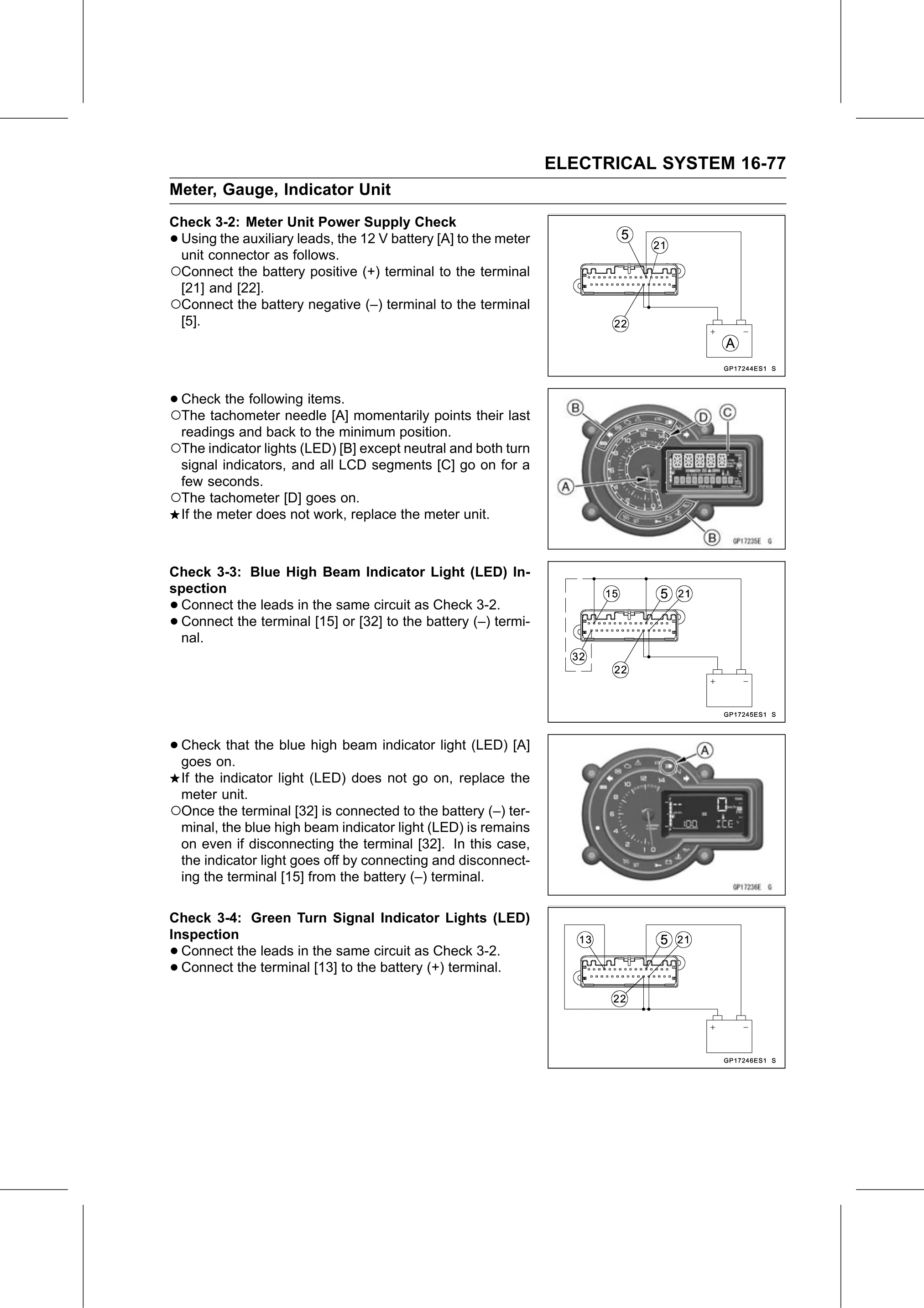
Check 3-2: Meter Unit Power Supply Check
•Using the auxiliary leads, the 12 V battery [A] to the meter
 unit connector as follows.
○Connect the battery positive (+) terminal to the terminal
 [21] and [22].
○Connect the battery negative (–) terminal to the terminal
 [5].

•○Check the following items.
  The tachometer needle [A] momentarily points their last
    readings and back to the minimum position.
○The indicator lights (LED) [B] except neutral and both turn
 signal indicators, and all LCD segments [C] go on for a
 few seconds.
○The tachometer [D] goes on.
 If the meter does not work, replace the meter unit.

Check 3-3: Blue High Beam Indicator Light (LED) In-
spection
•Connect the leads in the same circuit as Check 3-2.
•Connect the terminal [15] or [32] to the battery (–) termi-
 nal.

• Check that the blue high beam indicator light (LED) [A]
  goes on.
 If the indicator light (LED) does not go on, replace the
 meter unit.
○Once the terminal [32] is connected to the battery (–) ter-
 minal, the blue high beam indicator light (LED) is remains
 on even if disconnecting the terminal [32]. In this case,
 the indicator light goes off by connecting and disconnect-
 ing the terminal [15] from the battery (–) terminal.

Check 3-4: Green Turn Signal Indicator Lights (LED)
Inspection
• Connect the leads in the same circuit as Check 3-2.
• Connect the terminal [13] to the battery (+) terminal.