Service Manual (KLZ1000C) — page 479 of 762
Frame › Center Stand Installation
Text on this page
FRAME 15-35
Side Stand, Center Stand
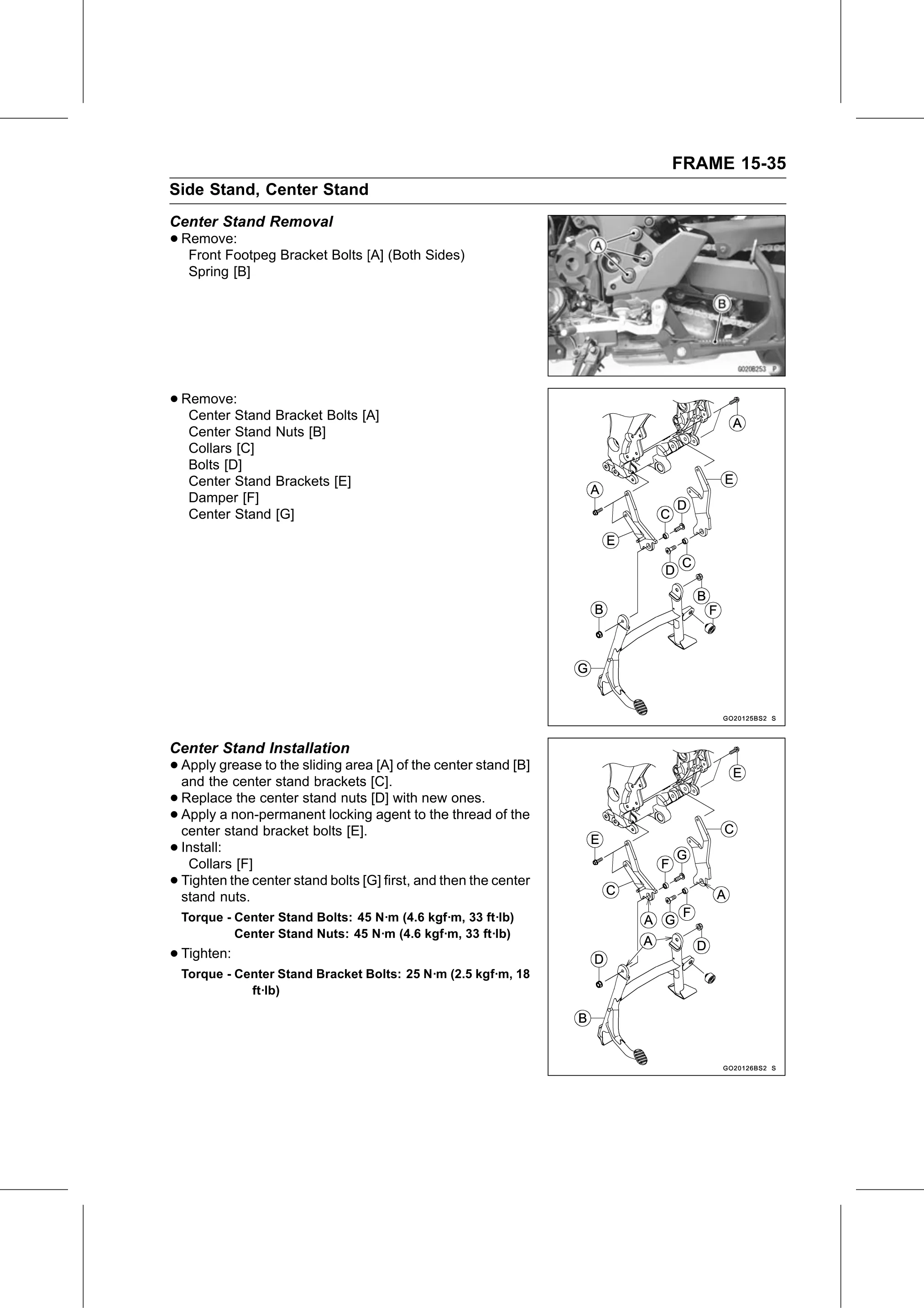
Center Stand Removal
• Remove:
   Front Footpeg Bracket Bolts [A] (Both Sides)
   Spring [B]

• Remove:
   Center Stand Bracket Bolts [A]
   Center Stand Nuts [B]
   Collars [C]
   Bolts [D]
   Center Stand Brackets [E]
   Damper [F]
   Center Stand [G]

Center Stand Installation
• Apply  grease to the sliding area [A] of the center stand [B]
  and the center stand brackets [C].
• Replace    the center stand nuts [D] with new ones.
• center stand bracket boltslocking
  Apply   a non-permanent
                               [E].
                                     agent to the thread of the

• Install:
   Collars [F]
• stand nuts.
  Tighten   the center stand bolts [G] first, and then the center

  Torque - Center Stand Bolts: 45 N·m (4.6 kgf·m, 33 ft·lb)
           Center Stand Nuts: 45 N·m (4.6 kgf·m, 33 ft·lb)
• Tighten:
  Torque - Center Stand Bracket Bolts: 25 N·m (2.5 kgf·m, 18
             ft·lb)