Service Manual (KLZ1000C) — page 554 of 762
Electrical System › Meter Operation Inspection
Text on this page
16-72 ELECTRICAL SYSTEM
Meter, Gauge, Indicator Unit

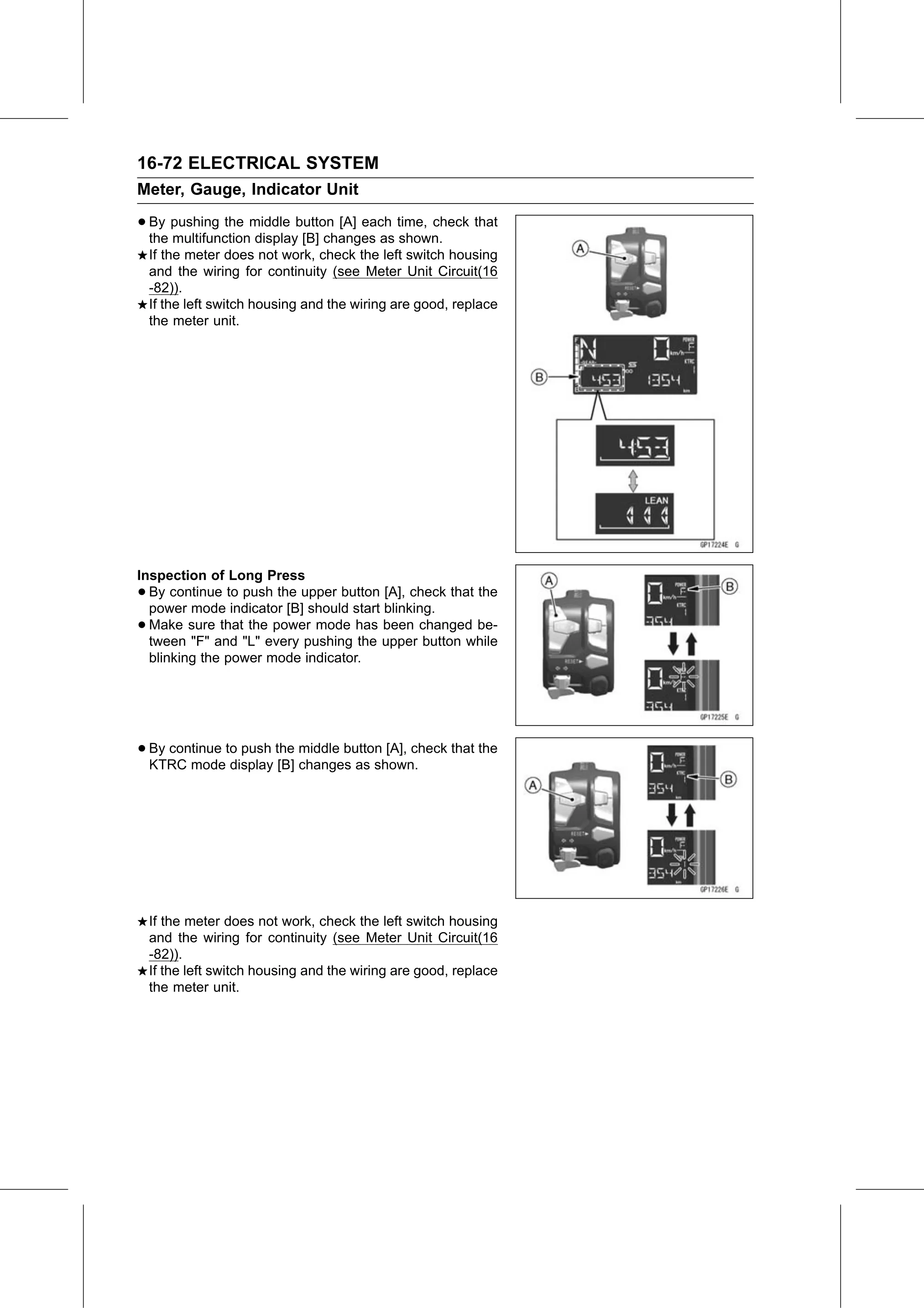
• By  pushing the middle button [A] each time, check that
  the multifunction display [B] changes as shown.
    If the meter does not work, check the left switch housing
    and the wiring for continuity (see Meter Unit Circuit(16
    -82)).
    If the left switch housing and the wiring are good, replace
    the meter unit.

Inspection of Long Press
• By continue to push the upper button [A], check that the
  power mode indicator [B] should start blinking.
• Make sure that the power mode has been changed be-
  tween "F" and "L" every pushing the upper button while
  blinking the power mode indicator.

• By continue to push the middle button [A], check that the
  KTRC mode display [B] changes as shown.

    If the meter does not work, check the left switch housing
    and the wiring for continuity (see Meter Unit Circuit(16
    -82)).
    If the left switch housing and the wiring are good, replace
    the meter unit.