Service Manual (KLZ1000C) — page 574 of 762
Electrical System › Key Registration
Text on this page
16-92 ELECTRICAL SYSTEM
Immobilizer System (Equipped Models)
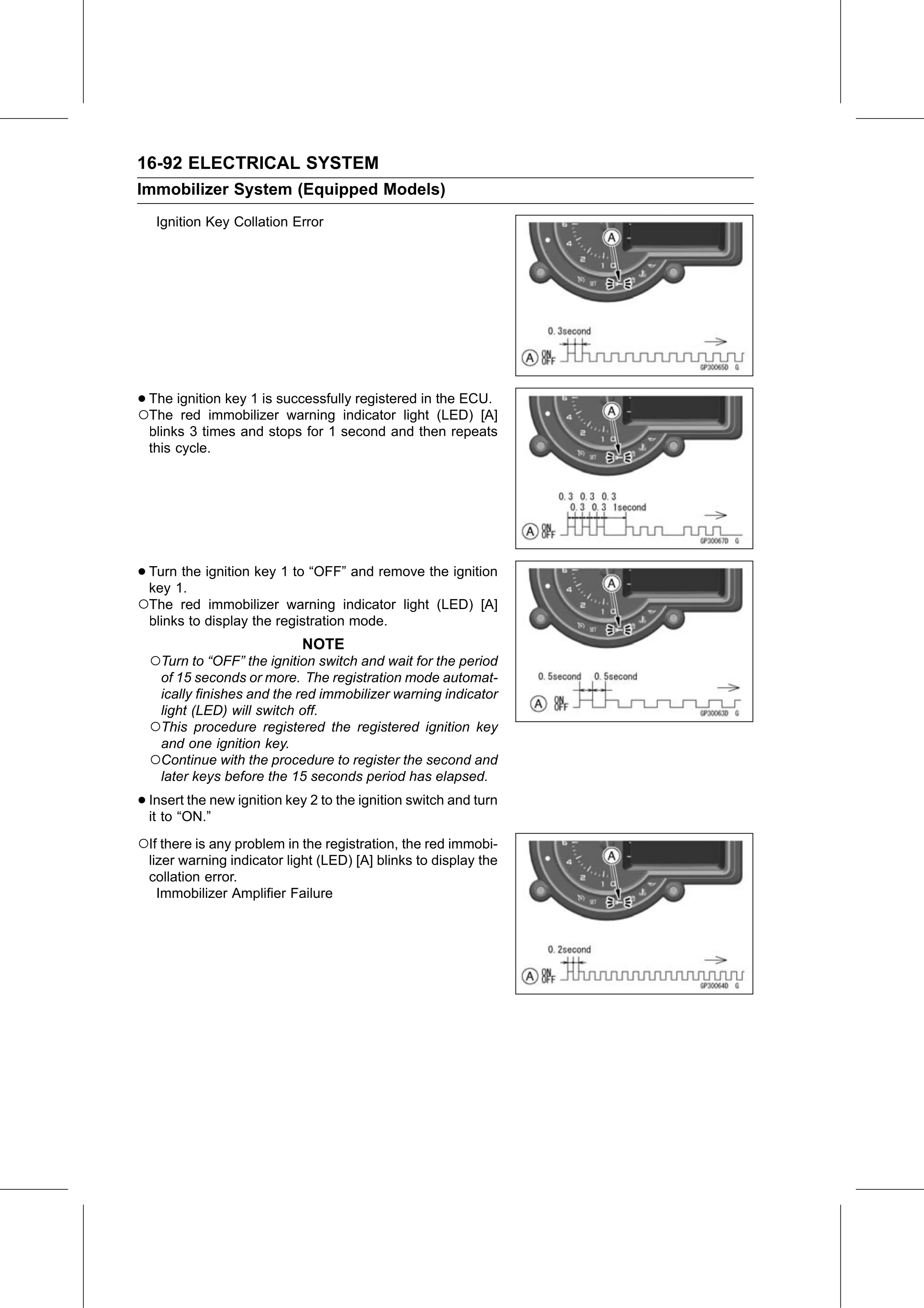
   Ignition Key Collation Error

•○The ignition key 1 is successfully registered in the ECU.
  The red immobilizer warning indicator light (LED) [A]
  blinks 3 times and stops for 1 second and then repeats
  this cycle.

• Turn the ignition key 1 to “OFF” and remove the ignition
  key 1.
○The red immobilizer warning indicator light (LED) [A]
  blinks to display the registration mode.
                            NOTE
  ○Turn to “OFF” the ignition switch and wait for the period
   of 15 seconds or more. The registration mode automat-
   ically finishes and the red immobilizer warning indicator
   light (LED) will switch off.
  ○This procedure registered the registered ignition key
   and one ignition key.
  ○Continue with the procedure to register the second and
   later keys before the 15 seconds period has elapsed.

• Insert the new ignition key 2 to the ignition switch and turn
  it to “ON.”

○If there is any problem in the registration, the red immobi-
  lizer warning indicator light (LED) [A] blinks to display the
  collation error.
    Immobilizer Amplifier Failure